1. Service Overview
ZTmail Chat is a new cross-platform instant messaging service based on the global email infrastructure. It uses cryptographic automation technology to provide end-to-end encryption and trusted identity services for chatting. It automates S/MIME certificate application, configuration, backup, and renewal, as well as digital signing, encryption, decryption, and signature verification. Users do not need to understand cryptography or handle these tasks manually. Choose the service edition that fits your needs, and the system takes care of the rest.
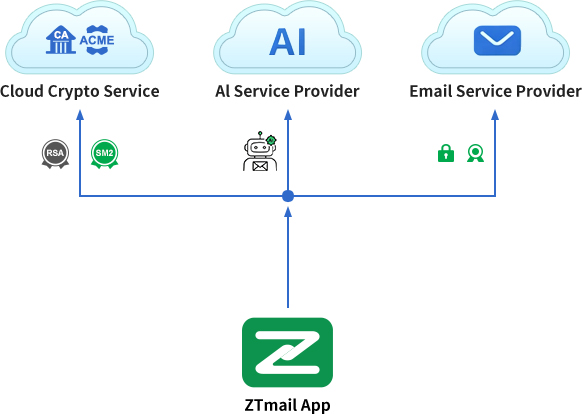
ZTmail Chat offers encrypted chat services through the ZTmail App, it is the world’s first email client to automate S/MIME certificate management and S/MIME protection while allowing users to connect their preferred AI services. Built on the international S/MIME standard and Chinese cryptographic standards, it supports both RSA and SM2 algorithms. It lets users connect to any AI model with its own API key.
2. How ZTmail Chat Cryptographic Application Automation Works
Through ZTmail App, the service automates certificate management and cryptographic operations for global users, users need to download and install ZTmail App. Of course, users can also continue using their existing email clients to handle message communication for emails. For large organizations that want centralized management of encryption keys, there’s an option for Enterprise Instant Messaging Gateway, where certificate automation and key management are handled by the Gateway, and option for S/MIME Automation services are also taken care of by the Gateway.
All of this happens automatically in the background. Users only need to click “Request Certificates” to authorize the automated process. Start with one click, and the system handles the rest.
3. Three Service Editions
ZTmail Chat Cryptographic Application Automation Service offers three editions for different needs. Choose an edition, and the system automatically configures the corresponding S/MIME certificate.
T4 icon, “Sponsor Validated”, displaying the person’s name, organization name, and country abbreviation
Paid SV service (from US$ 9), showing recipients the organization identity and personal identity, and automatically configuring an SV identity certificate.
The edition determines the certificate, and the certificate is configured automatically. The General Edition provides free chat cryptographic application automation for mailbox identity. Users can choose a paid service based on identity display, compatibility with external email clients, and trust-domain requirements. ZTmail App automatically applies, configures, and renews the corresponding certificates. Service terms range from one to five years, while an S/MIME certificate can be valid for no more than two years. For service terms longer than two years, certificate renewal is provided automatically at no additional charge before the certificate expires. Identity levels T1 / T2 / T3 / T4 answer “What identity does the chat initiator present?” Product models E1/E2/E3 answer “Which trust architecture is used, and how does it balance identity display in ZTmail App with compatibility across the wider email ecosystem?”
4. General Edition — Two Products
Designed for users worldwide, the General Edition provides a complete S/MIME cryptographic application automation service, including free automated application for and use of MV S/MIME certificates. Users can choose RSA and/or SM2 S/MIME certificates according to their environment and interoperability needs. Actual signing, encryption, and certificate compatibility depend on the certificates, email clients, and trust settings used by both parties.
Download ZTmail App for free, add an email account, then select “Request Certificates” under Settings > Certificates. The App automatically validates mailbox control, applies for the certificate, retrieves it after issuance, and configures it for use. The MV S/MIME certificate is free and trusted within the ZTmail ecosystem. When a digitally signed chat message is sent, ZTmail App displays the T1 identity level. Outlook may show a “There is a problem with the signature” warning until the root certificate is manually trusted. This free product is MV-E1 and is suitable for encrypted communication within the ZTmail ecosystem. For global trust, users can purchase MV-E2, which uses an MV S/MIME certificate issued by a public CA. Outlook and other email clients can then display signature and encryption indicators without that warning, subject to their trust configuration.
Trusted MV Email Security (T1)
Global-Trusted MV Email Security (T1)


- Automatically configure an MV S/MIME certificate
- Display mailbox identity in ZTmail App
- Outlook may show a signature warning until the root certificate is manually trusted
- Automatically configure an MV S/MIME certificate
- Display mailbox identity in ZTmail App
- Outlook displays signatures and encryption indicators normally
You are purchasing interoperability and automated certificate management, not just an S/MIME certificate. Automated digital signatures help recipients verify the sender’s identity and detect changes to signed content. Once you select a product, ZTmail App automatically applies for and configures the corresponding S/MIME certificate. Users with an MV identity can also add personal or organization identity services. The same mailbox can hold MV/IV/OV/SV identities, allowing users to choose the appropriate identity for different sending scenarios.
5. Personal Edition — Three Products
The Personal Edition is for users worldwide who want to present their personal identity. It provides the full S/MIME cryptographic application automation service, including automated application for and use of S/MIME IV certificates. When ordering, users can choose RSA and/or SM2 certificates. If they initially select only RSA, they can apply for an SM2 certificate later at no additional charge, and vice versa.
If you have not yet installed ZTmail App, download it and apply for a free MV S/MIME certificate before purchasing; email encryption requires an MV certificate. After purchase, the app automatically configures an IV S/MIME signing certificate. ZTmail App displays the T2 validated identity, your name and country abbreviation, when you send digitally signed chat message. Three models are available: IV-E1 uses ZTmail Trust; Outlook may show a signature warning until the root certificate is manually trusted. IV-E2 uses Global Trust, with the IV certificate issued by a public CA. IV-E3 uses Hybrid Trust, automatically configuring a globally trusted MV S/MIME certificate together with a ZTmail-trusted IV S/MIME certificate. This combines identity display within the ZTmail ecosystem with trust in the wider ecosystem without requiring every identity certificate to be globally trusted. With E2 and E3, Outlook and other email clients can display signature and encryption indicators without that warning, subject to their trust configuration.
Trusted IV Email Security (T2)
Global-Trusted IV Email Security (T2)
Hybrid-Trusted IV Email Security (T2)


- Automatically configure an IV S/MIME certificate
- Display personal identity in ZTmail App
- Outlook may show a signature warning until the root certificate is manually trusted
- Automatically configure an IV S/MIME certificate
- Display personal identity in ZTmail App
- Outlook displays signatures and encryption indicators normally.
- Automatically configure IV and MV S/MIME certificates
- Display personal identity in ZTmail App
- Outlook displays signatures and encryption indicators normally
Note: For E1 and E3, identity verification is performed by independent professional identity-verification providers selected by ZoTrus Technology, either directly or through their verification interfaces. For E2, identity verification is performed by an international CA selected by ZoTrus Technology. ZTmail App does not store users’ identity-verification evidence.
You are purchasing identity presentation, interoperability, and automated certificate management, not just an S/MIME certificate. Automated digital signatures help recipients verify the sender’s identity and detect changes to signed content. Once you select a product, ZTmail App automatically applies for and configures the corresponding S/MIME certificate. If your personal identity has already been validated, you do not need to repeat personal identity validation when purchasing Employee Identity.
6. Organization Edition — Organization Identity — Three Products
The Organization Identity service is for organizations worldwide that want to present their organization identity. It provides the full S/MIME cryptographic application automation service, including automated application for and use of OV S/MIME certificates. Users can choose RSA and/or SM2 certificates when ordering. If they initially select only RSA, they can apply for an SM2 certificate later at no additional charge, and vice versa. This edition validates control of the organization’s email address; it does not validate an individual employee’s identity.
If you have not yet installed ZTmail App, download it and apply for a free MV S/MIME certificate before purchasing; email encryption requires an MV certificate. After purchase, the app automatically configures an OV S/MIME signing certificate. ZTmail App displays the T3 validated identity, including the organization name and country abbreviation, when you send digitally signed chat message. Three models are available: OV-E1 uses ZTmail Trust; Outlook may show a signature warning until the root certificate is manually trusted. OV-E2 uses Global Trust, with the OV certificate issued by an international CA. OV-E3 uses Hybrid Trust, automatically configuring a globally trusted MV S/MIME certificate and a ZTmail-trusted OV S/MIME certificate. This combines identity display within the ZTmail ecosystem with trust in the wider ecosystem without requiring every identity certificate to be globally trusted. With E2 and E3, Outlook and other email clients can display signature and encryption indicators without that warning, subject to their trust configuration.
Trusted OV Email Security (T3)
Global-Trusted OV Email Security (T3)
Hybrid-Trusted OV Email Security (T3)

- Automatically configure an OV S/MIME certificate
- Display organization identity in ZTmail App
- Outlook may show a signature warning until the root certificate is manually trusted
- Automatically configure an OV S/MIME certificate
- Display organization identity in ZTmail App
- Outlook displays signatures and encryption indicators normally
- Automatically configure OV and MV S/MIME certificates
- Display organization identity in ZTmail App
- Outlook displays signatures and encryption indicators normally
Note: For E1 and E3, identity verification is performed by independent professional identity-verification providers selected by ZoTrus Technology, either directly or through their verification interfaces. For E2, identity verification is performed by a public CA selected by ZoTrus Technology. ZTmail App does not store users’ identity-verification evidence.
You are purchasing identity presentation, interoperability, and automated certificate management, not just an S/MIME certificate. Automated digital signatures help recipients verify the sender’s identity and detect changes to signed content. ZTmail App automatically applies for and configures the corresponding certificate. After purchasing Organization Identity, you can purchase additional organization identities with the same domain email address without having to validate the organization again, and add Employee Identity without repeating organization validation, although the employee’s personal identity must be validated.
7. Organization Edition — Employee Identity — Three Products
The Employee Identity service is for organizations worldwide that want to present both the organization’s identity and the employee’s personal identity. It provides the full S/MIME cryptographic application automation service, including automated application for and use of SV S/MIME certificates. Users can choose RSA and/or SM2 certificates when ordering. If they initially select only RSA, they can apply for an SM2 certificate later at no additional charge, and vice versa. This edition requires validation of the employee’s personal identity and their association with the organization.
If you have not yet installed ZTmail App, download it and apply for a free MV S/MIME certificate before purchasing; email encryption requires an MV certificate. After purchase, the App automatically configures an SV S/MIME certificate. When you send digitally signed chat message or chat with someone, ZTmail App displays the T4 validated identity, including the employee’s name, organization name, and country abbreviation. Three models are available: SV-E1 uses ZTmail Trust; Outlook may show a signature warning until the root certificate is manually trusted. SV-E2 uses Global Trust, with the SV certificate issued by an international CA. SV-E3 uses Hybrid Trust, automatically configuring a globally trusted MV S/MIME certificate and a ZTmail-trusted SV S/MIME certificate. This combines identity display within the ZTmail ecosystem with trust in the wider ecosystem without requiring every identity certificate to be globally trusted. With E2 and E3, Outlook and other email clients can display signature and encryption indicators without that warning, subject to their trust configuration.
Trusted SV Email Security (T4)
Global-Trusted SV Email Security (T4)
Hybrid-Trusted SV Email Security (T4)

- Automatically configure an SV S/MIME certificate
- Display personal and organization identities in ZTmail App
- Outlook may show a signature warning until the root certificate is manually trusted
- Automatically configure an SV S/MIME certificate
- Display personal and organization identities in ZTmail App
- Outlook displays signatures and encryption indicators normally
- Automatically configure SV and MV S/MIME certificates
- Display personal and organization identities in ZTmail App
- Outlook displays signatures and encryption indicators normally.
Note: For E1 and E3, identity verification is performed by independent professional identity-verification providers selected by ZoTrus Technology, either directly or through their verification interfaces. For E2, identity verification is performed by an international CA selected by ZoTrus Technology. ZTmail App does not store users’ identity-verification evidence.
You are purchasing identity presentation, interoperability, and automated certificate management, not just an S/MIME certificate. Automated digital signatures help recipients verify the sender’s identity and detect changes to signed content. ZTmail App automatically applies for and configures the corresponding certificate. After purchasing Employee Identity, you can purchase additional employee identities with the same domain email address, and also can add Organization Identity without repeating organization validation.
8. Technical Architecture
ZTmail uses an integrated client-and-cloud Zero Trust architecture designed to minimize the client’s dependence on cloud services:
- Private keys stay local: The client generates keys locally and submits only a certificate signing request (CSR). The private key never leaves the local device.
- Automated certificate issuance: After the ZTmail Cloud CA receives the CSR, it sends a verification code to the user’s mailbox. ZTmail App recognizes the verification email and automatically submits to the ACME service, to realizes the automatically issuance of RSA and SM2 S/MIME certificates.
- Automated retrieval and deployment: ZTmail App automatically retrieves issued certificates and configures them for use.
- Everyday cryptographic operations: Digital signing, encryption, decryption, and signature verification are integrated into the chat workflow, so users do not need to learn cryptographic techniques.
- Automated key management: Users’ private keys are encrypted and stored on their own devices, with encrypted backups sent to their own mailbox. Organizations that need centralized key management can purchase the ZTmail Enterprise Key Management System (EKMS), where keys are generated and managed. ZTmail App retrieves employees’ certificate keys from EKMS for use on their local devices.
- User-controlled backup and recovery: Sensitive user data including private keys for certificates, contacts, calendar entries, and tasks is automatically encrypted and backed up to the user’s own mailbox. Users can manually sync the backup to ZTmail App on another device. Keep the recovery key safe and follow the recovery process to restore the backup.
9. Get Started
You don’t need to understand certificates. Just choose the service that fits your needs.
- Anyone can start with the free General Edition, which provides the full set of core features. The available products differ in their certificate trust domain.
- Individuals → Choose the Personal Edition to automate email encryption and display a validated personal identity.
- Organizations → Choose Organization Identity to present the organization without validating the employee’s identity, or Employee Identity that employee identity validation is required.
- Mid-sized and large organizations → Deploy the ZTmail Enterprise Instant Messaging Gateway to automate chat encryption and digital signing without replacing existing email clients.
Download ZTmail App for Free | Learn About the Enterprise Instant Messaging Gateway