The Recipient Sees a Trusted Identity, Not Just "An Encrypted Email"
Open your inbox. You receive dozens of emails every day. Which ones are trustworthy? Which are phishing attempts? Which are impersonation scams pretending to be your boss?
Traditional email clients can't answer these questions. The m ail list only shows the sender's name and subject line , no identity information whatsoever. Because the traditional email protocol (SMTP) was designed in the 1980s, the sender address can be forged at will, and there is no mechanism to verify "who really sent this email."
1. ZTmail changes all of this. every email, identity immediately.
Identity icons in the email
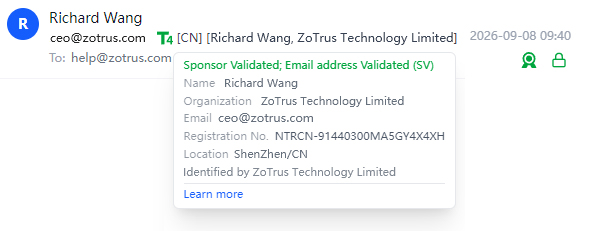
In ZTmail's inbox, every email comes with an identity badge, as shown below. It not only indicates that the email is encrypted and digitally signed, but also shows which algorithm was used (e.g., RSA or SM2 , or PQC ). Most importantly, it displays the T4 icon — the Sponsor validated icon . Clicking on this icon reveals detailed sender identity information, clearly telling the recipient: "the sender's organization identity and individual identity — name — have all been v alidated ." The organization identity also includes the organization's registration number and location.
2. A digital signature is the foundation of trust
When viewing an email, recipients can easily determine whether it is trustworthy or suspicious , no technical knowledge required.
Four identities, four levels of trust
The CA/Browser Forum S/MIME Certificate Working Group defines four identity validation levels. ZTmail fully implements them in the recipient-side visualization:
- (1) T1 ▪ MV (Mailbox-Validated)
Has a digital signature. Validates only email ownership. What the recipient sees: the sender owns this email address. - (2) T2 ▪ IV (Individual-Validated)
Has a digital signature. Validates individual identity. What the recipient sees: the sender's real name. - (3) T3 ▪ OV (Organization-Validated)
Has a digital signature. Validates organization identity. What the recipient sees: the sender's organization name. - (4) T4 ▪ SV (Sponsor-Validated)
Has a digital signature. Validates both organization and individual identity. What the recipient sees: organization name + employee name, double confirmation, the highest level of trust.
3. The higher the identity level, the higher the trust
What recipients see is no longer just "this email has a digital signature," but "who sent it, with what identity, and whether the content has been tampered with" , three questions, answered at a glance.
Every email that carries an identity icon instantly strengthens the recipient's trust online, helping to facilitate more transactions and communications.
Why can't other email clients identify the sender?
The email sender addresses can be forged at will. This is a design flaw in the SMTP protocol , it is only responsible for "delivering mail from A to B," not for "verifying who A is."
SPF, DKIM, and DMARC solve some of these problems, but they primarily verify the "server" identity, not the "sender" identity. An email passing SPF/DKIM checks only proves that it came from an authorized server , not that the sender is who they claim to be.
Digital signature technology (S/MIME) solves this: the sender signs with their private key, and the recipient verifies with the sender's public certificate. If an email lacks a digital signature, or if the signature verification fails, the recipient's email client should display a clear warning.
But traditional email clients offer very limited support for digital signatures , either they don't display them at all, or they only show a vague "signature" icon. Users have no idea what level of identity stands behind that signature.
ZTmail turns identity information from "technical detail" into "user interface."
4. AI assistant: automatically detects fraudulent emails
Beyond identity display, ZTmail's AI Assistant actively helps you detect potential fraud and phishing emails . P rovided you have configured your own AI service provider's API key and related parameters.
AI detects sender anomalies
The AI Assistant automatically analyzes email characteristics to identify suspicious signals:
- Whether the sender domain matches the display name
- Whether there is domain impersonation (e.g., rnicrosoft.com impersonating microsoft.com)
- Whether the sender IP originates from an unusual geographic location
- Whether the sender's historical behavior is normal
AI analyzes email content
The AI Assistant automatically scans email content to identify fraud indicators:
- Urgent tone, demands for immediate action ("transfer now," "respond immediately")
- Suspicious links or attachments
- Requests for sensitive information (passwords, bank account details)
- Requests that deviate from historical communication patterns
In 2026, AI-generated phishing emails already account ed for 86% of all phishing emails. These emails are grammatically flawless, contextually relevant, and far more difficult to detect with the naked eye. The traditional approach of "looking for spelling mistakes" is no longer reliable. The AI Assistant's automatic detection capability is the critical defense against this new threat.
AI provides security recommendations
⚠️ Security Alert: This email has the following risks:
- Sender domain does not match the display name
- Email contains suspicious links
- Sender is not in your frequent contacts list
Recommendation : Proceed with caution. Do not click links or provide personal information.
Below is an example of a fraudulent email after AI analysis: Highly suspicious. This is a typical financial phishing/scam email. The attacker is likely mass-sending this within the target organization, tricking the finance department into joining a fake social media group. The next step will be impersonating the company executive to demand an "urgent deposit" or "an annual acco unt review" transfer.
5. Identity d isplay + AI d etection = Double p rotection
Identity display allows users to actively judge email trustworthiness: emails with digital signatures display identity levels clearly; emails without digital signatures are clearly marked as "Identity Not V alidated".
AI detection provides passive defense: automatically detecting anomalies and proactively alerting users to risks.
Together, they leave phishing and fraudulent emails with nowhere to hide.
Traditional email clients tell you "you have mail".
ZTmail tells you , "who sent it, with what identity, and whether it is trustworthy."
Who sent this encrypted email? Identity level, clear at a glance. Who sent this fraudulent email? AI detects it, alerts you automatically.
Upgrade to the Trusted Identity Edition, and let every recipient see your trusted identity.
💡 For guidance on choosing which identity to send with, see our companion article: Choose What Level of Identity to Send With — Four Identities, Four Levels of Trust →