Choose What Identity Level to Send Email
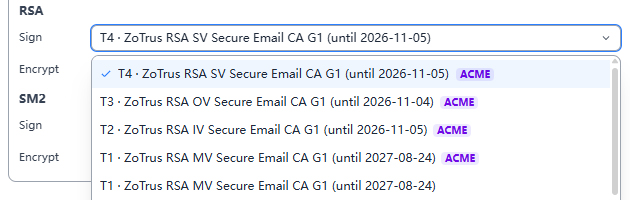
One of the innovations of ZTmail is that user can choose its own trust level before writing or replying to emails, so recipient can see what level of trust the sender has. User just need to set which signing certification is the default in 'Settings – Certificates', as shown screenshot below, the drop-down menu lists all trust level signing certificates the user has applied for.
You might be wondering: Why do I need to choose an identity just to send an email?
1. Traditional Email: Anyone Can Impersonate You
The traditional email protocol (SMTP) was designed in the 1980s without identity verification in mind. This means: Anyone can put any name and email address in the "From" field.
This is the root cause of phishing emails, impersonation scams, and Business Email Compromise (BEC) attacks. You receive an email from your "boss" asking for an urgent wire transfer, but the sender address is forged. Traditional email gives you no way to know: who really sent this email?
Digital signatures solve the "signed or not" problem. But ZTmail goes further: senders can choose what level of identity to sign with.
2. Four Identities, Four Levels of Trust
The CA/Browser Forum S/MIME Certificate Working Group defines four validation levels for email certificates. ZTmail implements all of them:
- T1 ▪ MV (Mailbox Validated) — "I own this email address"
Validates only email ownership. Suitable for scenarios where you prefer not to reveal your identity.
What recipients see: "The sender owns this email address." - T2 ▪ IV (Individual Validated) — "I am this person"
Validates individual identity (requires submitting official ID such as a national ID or passport). Suitable for personal email communication. Lawyers, doctors, freelancers who need to prove who they are to clients.
What recipients see: The sender's real name. - T3 ▪ OV (Organization Validated) — "I am an employee of this organization"
Validates organization identity. Suitable for business communication such as vendor confirmations, contract quotations, customer service, etc.
What recipients see: The sender's organization name. - T4 ▪ SV (Sponsor Validated) — "I am a specific person at this organization"
Validates both organization and individual identity, with the organization sponsoring the employee. The certificate displays both the organization’s name and the employee's name. Suitable for government, financial institutions, and large enterprises with the highest compliance requirements.
What recipients see: "A specific person at a specific organization" — Double confirmation, the highest level of trust.
3. When to Choose Which Identity?
Which identity you choose depends on what you want the recipient to see:
- T1 ▪ Mailbox Validated: Proves only that you have the email address. Choose this when you don't want to reveal your identity.
- T2 ▪ Individual Validated: Validates your personal identity. Displays your real name. Choose this for personal email communication.
- T3 ▪ Organization Validated: Validates your organization identity. Displays your organization name. Choose this for business communication.
- T4 ▪ Sponsor Validated: Validates both your organization and personal identity. Displays your organization name and your name. Choose this for high-trust scenarios.
The higher the identity level, the higher the trust. Don't want to reveal your identity? Choose T1. Only need to prove you're an employee of an organization? Choose T3. Need to prove you're a specific person at a specific organization? Choose T4. Your identity, your choice. Trust is for the recipient to judge.
4. Why Don't Other Email Clients Have This Feature?
Other email clients have only solved the problem of "whether you can encrypt," not "what identity you encrypt with."
Most email clients support S/MIME, but they either support only one certificate, require users to manually switch certificates, or require recipients to dig through certificate details to find the subject name after receiving an email — processes so complex that almost no one uses them.
ZTmail turns identity selection into a simple dropdown menu in the compose window. No technical knowledge required, no certificate switching needed — just click to choose what identity to send with.
5. Higher Identity, Higher Trust
This is not just a feature design, it's ZTmail's business model:
- Free Tier: T1 identity (Email Validated), allowing every user to experience encrypted email.
- Trusted Identity Edition: T2 / T3 / T4 identities. Users pay for "making the recipient trust me more."
What recipients see is no longer just "this email has a digital signature," but "what level of trusted identity signed this email." The higher the identity level, the more prominent the display, the stronger the trust.
Upgrade to Trusted Identity Edition, and let every recipient see your trusted identity.
💡 For a detailed look at what recipients see, see the companion article: The Recipient Sees a Trusted Identity, Not Just "An Encrypted Email" →