ZTmail App FAQ — 37 Questions
Explain email security, S/MIME operations, certificate automation, trusted identity, privacy, and the available trust strategies.
ZTmail App is an email client that integrates AI capabilities, it automates S/MIME certificate management and email cryptographic operations. It automates certificate application, configuration, backup, and renewal, as well as digital signing, encryption, decryption, and signature validation. It also allows users to connect their preferred AI services using their own API keys.
ZTmail App is designed for individuals, professionals, families, and small and midsize businesses that want practical email cryptographic capacities without having to become certificate or PKI experts. Organizations that prefer to retain their existing email clients can use the ZTmail S/MIME Automation Gateway.
No. ZTmail App is an email client, not an email service provider. You can continue using your existing email account and mailbox while adding automated S/MIME certificate management, digital signing, encryption, decryption, and signature validation.
Yes. The General Edition offers MV‑E1, a free S/MIME automation service with full function automated certificate management and core cryptographic operations. It provides mailbox identity (MV), displayed as T1 in ZTmail App. A paid option, MV‑E2, is also available for users who want a globally trusted MV certificate.
The General Edition provides the core S/MIME cryptographic application automation experience, including automated certificate application, configuration, backup, and renewal, as well as digital signing, encryption, decryption, and signature validation. It displays mailbox identity as T1 — Mailbox Validated (MV).
The General Edition does not validate or display a sender’s personal or organization identity. Users who want recipients to see their personal name, organization name, or both can choose a corresponding identity service.
No. The General Edition provides core S/MIME cryptographic operations. The principal differences between the available service options concern certificate trust, interoperability, and identity presentation, rather than removing the core cryptographic functions from the free option.
The free MV‑E1 uses ZTmail Trust. MV‑E2 uses a globally trusted MV certificate issued by a public CA.
ZTmail App uses the recipient’s S/MIME public‑key certificate to encrypt email. When the required recipient certificate is available, the App handles the cryptographic operation within the normal email workflow, so users do not need to perform encryption manually.
If the recipient’s certificate is not available, it can be done by sending the other person an email with a digital signature for public key exchange. Encryption also requires the recipient to have the corresponding private key to decrypt the message.
Yes, provided the corresponding certificate and private key are installed in Windows and the message was encrypted for that key. ZTmail App manages its S/MIME certificates within the App, while Outlook on Windows uses the certificate and key facilities available in Windows.
To decrypt ZTmail App‑encrypted messages in Outlook, export the relevant certificate with its private key from ZTmail App and install it in Windows. Keep the exported private‑key file secure.
Yes. ZTmail App supports S/MIME certificates using RSA and SM2, and supports RSA and SM2 S/MIME certificate automation. You can choose RSA, SM2, or both according to your requirements and the interoperability needs of your communication partners.
Actual compatibility depends on the certificates, algorithms, email clients, and trust settings used by both parties.
Of course. In 'Settings ‑ Certificates', select the certificate you want to export, and four buttons will appear: View Certificate, Download Certificate, Export PFX, and Delete. Be careful when deleting!Once deleted, encrypted emails cannot be decrypted.

The letter “A” indicates that the certificate was obtained automatically through ACME (Automatic Certificate Management Environment).
- A — ACME:The certificate was obtained automatically through ACME
- B — Backup: The certificate was restored from a backup created on another device.
- I — Import: The certificate was imported from the local computer, either from a PFX file or from the Windows certificate store.
- G — Global trust: The certificate belongs to the Global Trust domain.
A certificate may display more than one indicator. For example, “I” and “G” displayed together indicate that the certificate was imported and belongs to the Global Trust domain.



Yes. ZTmail App supports importing existing S/MIME certificates and their private keys. This allows you to continue using certificates you already have and can help you access previously encrypted email that requires those keys. After importing, ZTmail App will automatically back up the imported certificates and private keys to the user's own mailbox, enabling automated backup and recovery management for all certificates and private keys.
Yes. You can import multiple S/MIME certificates and select an available certificate as your default. This lets you choose the appropriate certificate for your email signing and encryption requirements.
The certificate selected for signing determines the identity associated with the signature. Encryption, meanwhile, depends on the recipient certificates and the keys needed by the intended recipients.
The Request Certificates action gives you control over whether to request certificates from the ZTmail cloud service. Automation does not mean that ZTmail enrolls you without your consent. You can use your own existing S/MIME certificates and private keys, or choose to request certificates through ZTmail App. Once you authorize the request, the App automates the supported certificate application, validation, retrieval, configuration, and lifecycle management processes.
No. ZTmail App automatically encrypts and backs up your certificates and private keys to your own mailbox. The backup is stored as an email attachment in the dedicated “ztmailbak” folder maintained by the App. When setting up ZTmail App on another device, you can use your Recovery Key to restore the encrypted backup through the supported recovery process. Keep your Recovery Key safe, and do not delete the “ztmailbak” folder, as doing so may remove the backup needed for recovery.
ZTmail App is designed to let you manage multiple email accounts in one place, including personal and business accounts. No fixed limit on the number of accounts you can add. The actual ability to connect each account depends on the email provider’s supported protocols, authentication methods, and account settings.
Yes, provided you import the certificate and corresponding private key required to decrypt the messages. This allows you to retain access to email that was encrypted using certificates previously used in ZTmail App or another email client. If you no longer have the required private key, the message generally cannot be decrypted. Keep your existing certificates and private‑key backups for as long as you need access to the associated encrypted email.
ZTmail App is designed around user‑controlled cryptographic keys. Private keys are generated locally and managed in the appropriate local environment keystore securely. For recovery across devices, the App automatically creates encrypted backups and stores them in the user’s own mailbox. Keep the Recovery Key secure, because it is important for restoring the backup.
Organizations that require centralized certificate and key management can consider the optional ZTmail Enterprise Key Management System (EKMS).
The ZTmail Cryptographic Application Automation Service provides the following editions:
- General Edition: Mailbox identity (MV), displayed as T1.
- Personal Edition: Individual identity (IV), displayed as T2.
- Organization Edition: Organization identity (OV), displayed as T3.
- Organization Employee Edition: Employee identity associated with an organization (SV), displayed as T4.
Each edition addresses a different identity requirement. Depending on the service selected, users can also choose among ZTmail Trust, Global Trust, and Hybrid Trust product models.
T1–T4 indicate the trust identity level represented by the S/MIME certificate:
- T1 — Mailbox Validated (MV): Validates control of the email mailbox.
- T2 — Individual Validated (IV): Presents a validated individual identity.
- T3 — Organization Validated (OV): Presents a validated organization identity.
- T4 — Sponsor Validated (SV): Presents both the individual’s identity and their association with an organization.
These trust levels help recipients understand which identity information has been validated. They do not, by themselves, guarantee that the content of an email is safe or that the sender is authorized to carry out a particular transaction.
These terms describe the trust architecture used by a product:
- ZTmail Trust: Uses certificates trusted within the ZTmail ecosystem.
- Global Trust: Uses certificates issued under a recognized public CA trust chain for broader external interoperability.
- Hybrid Trust: Combines a globally trusted MV S/MIME certificate with a ZTmail‑trusted IV, OV, or SV identity certificate.
Hybrid Trust is designed to combine broader trust compatibility with the richer identity presentation available within the ZTmail ecosystem. A ZTmail‑trusted certificate does not automatically become globally trusted simply because it is used alongside a globally trusted certificate.
E1, E2, and E3 identify the trust architecture of a product, rather than the sender’s identity level.
- E1 — ZTmail Trust: Uses a ZTmail‑trusted certificate. External email clients may show a signature warning until the relevant root certificate is trusted.
- E2 — Global Trust: Uses a globally trusted S/MIME identity certificate issued by a public CA.
- E3 — Hybrid Trust: Combines a globally trusted MV certificate with a ZTmail‑trusted IV, OV, or SV identity certificate.
For example, IV‑E3 means an individual identity service using Hybrid Trust. The corresponding identity level is T2.
Different users have different identities and interoperability requirements. Some need certificates that are broadly trusted by external email clients, while others prioritize identity presentation within the ZTmail ecosystem.
ZTmail offers different trust architectures so users can choose according to their needs and budget. Hybrid Trust combines a globally trusted MV certificate with a ZTmail‑trusted higher‑level identity certificate, rather than requiring every certificate in the combination to be globally trusted.
No. They answer different questions:
- Identity level (T1–T4): What identity does the sender present?
- Trust architecture (E1–E3): What certificate trust model does the product use?
For example, an SV certificate represents T4 identity. Depending on the selected product model, it may use ZTmail Trust (SV‑E1), Global Trust (SV‑E2), or Hybrid Trust (SV‑E3).
ZTmail App displays validated identity information in the email interface, rather than requiring users to inspect technical certificate details manually. Depending on the certificate and validation level, the interface can indicate whether the mailbox, individual, organization, or both individual and organization have been validated.
Users should consider this information alongside the digital signature’s validation status and the context of the message. Identity indicators help make validated identity visible; they are not a substitute for judgment or other security controls.
A certificate’s identity information is more useful when people can understand it. In some email clients, identity and certificate details are buried in technical menus.
ZTmail App makes validated identity information visible in the email interface, helping users distinguish mailbox validation from individual or organization identity validation.
ZTmail App can display supported identity information for certificates issued under Global Trust as well as ZTmail Trust, provided the certificate contains the relevant standardized identity assurance information and passes the applicable validation checks.
The App determines how to display the trusted identity by reading the identity assurance level OID contained in the S/MIME certificate. These identity assurance levels are defined by the CA/Browser Forum S/MIME Workgroup defined S/MIME Certificate Baseline Requirements, not by ZTmail. For example, an SV (Sponsor Validated) certificate issued under Global Trust can be displayed by ZTmail App with the T4 identity indicator, together with the validated individual’s name and organization name.
The App interprets the identity assurance information encoded in the certificate. The displayed identity trust level is based on the certificate information and validation results, not merely on whether the certificate belongs to one particular trust domain.
The interface alone cannot prevent impersonation. The underlying protection comes from cryptographic signatures and appropriate certificate validation.
ZTmail App makes validated identity information easier to see, helping users recognize the identity associated with a signed message and notice when an expected identity is absent or different. Users should still check signature validity and remain alert to suspicious content, links, and requests.
The editions differ in the identity they are designed to present:
- Personal Edition (IV): Presents the validated individual’s name and country abbreviation.
- Organization Edition (OV): Presents the validated organization’s name and country abbreviation. It validates control of the organization’s email address, not an individual employee’s identity.
- Organization Employee Edition (SV): Presents both the employee’s name and the organization’s name, requiring validation of the employee’s identity and their association with the organization.
Choose the edition based on the identity you want recipients to see.
Yes. The same email account can hold multiple identities, subject to the applicable validation and service requirements. The product page describes the ability to use MV, IV, OV, and SV identities with the same mailbox.
This lets users choose an appropriate identity for different sending scenarios. For example, they may use mailbox identity for general correspondence and a validated personal or organization identity for more formal communication.
Yes. ZTmail App allows users to connect their preferred AI services using their own API keys. This gives users flexibility to choose an AI model or provider instead of being locked into a single AI service.
The product principle is: “AI, Your Key.”
No. AI and cryptography serve different purposes. S/MIME provides cryptographic protection through digital signatures and encryption, while AI can support productivity and intelligent email features.
AI does not replace certificate validation, digital signatures, or encryption. ZTmail’s product principle is: “Cryptography for Trust. AI for Productivity.”
Yes. ZTmail App supports existing email accounts that provide IMAP access methods, including business email accounts using your own domain and popular email services. For accounts that support IMAP and SMTP, the App can often detect and configure the necessary settings automatically. If automatic configuration is unavailable, you can enter the settings provided by your email service provider.
The configuration method depends on the provider:
- Gmail: The account can be configured through IMAP and SMTP. Depending on your Google account’s security settings, you may need to create and use an App Password rather than your regular account password.
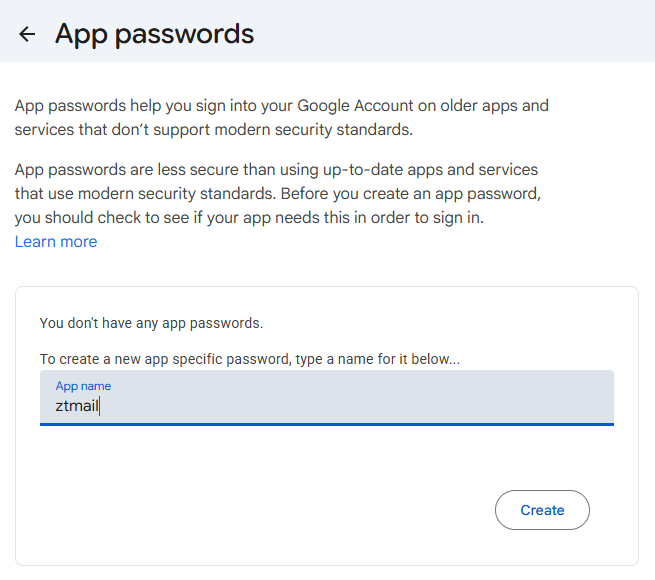
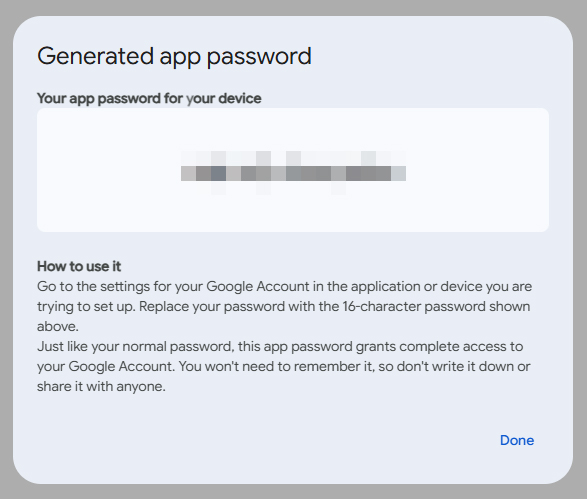
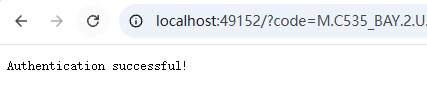
- Outlook: ZTmail App supports signing in through Microsoft account OAuth authorization. Follow the sign‑in flow and grant the requested authorization. Click 'Sign in with Outlook' on the right side of the add email account interface, and it will automatically take you to the Outlook login page. After entering your account password correctly, you'll see an authorization success page like the one shown below.
Email Service Provider requirements may change, so follow the current instructions displayed by the provider and ZTmail App.
ZTmail App manages its certificates within the App, while Outlook on Windows relies on the certificates and private keys available to Windows. To let Outlook decrypt messages encrypted for your ZTmail certificate, export the certificate with its private key and install it in Windows. After installation, Outlook can use that certificate for decryption when the message was encrypted for the corresponding public key.
No. You can choose RSA, SM2, or both. ZTmail App automates the supported certificate application and configuration process, while allowing you to choose the algorithms that fit your requirements. If you need to communicate with people using different email clients or cryptographic environments, check that the recipients’ systems support the relevant algorithms and certificate formats.
Compatibility depends on the certificate’s trust chain, the recipient’s email client, and its trust settings.
With E1 products, Outlook may show a signature warning until the relevant root certificate is manually trusted. E2 and E3 are designed to improve interoperability with external email clients, which can display signature and encryption indicators normally when the certificate chain and trust settings are supported. Recipients’ email clients must also support the relevant S/MIME features. No single certificate model guarantees identical display or behavior in every client and environment.