Q1: What is ZTmail?
AZTmail is a cryptographic email platform that automates S/MIME certificate lifecycle management, email encryption, decryption, digital signatures, signature verification, and trusted email identity.
Q2: What is S/MIME?
AS/MIME is the abbreviation of Secure/Multipurpose Internet Mail Extensions. It is an established email security standard that uses digital certificates and public-key cryptography to provide email encryption, digital signatures, and trusted digital identity.
Q3: Why is S/MIME still difficult to use?
AThe underlying cryptography is mature, but certificate enrollment, identity validation, deployment, renewal, key management, and email-client configuration have traditionally required too much manual work. ZTmail automates these processes.
Q4: What does ZTmail automate?
AZTmail automates the S/MIME certificate lifecycle and the cryptographic operations required for email communication, including signing, encryption, decryption, and signature verification.
Q5: Does ZTmail replace my existing email infrastructure?
ANo. ZTmail is designed to complement existing email infrastructure. ZTmail App provides an email client with built-in S/MIME automation, while ZTmail S/MIME Automation Gateway adds a cryptographic layer to existing organizational email infrastructure.
Q6: What are the two main ways to use ZTmail?
AIndividuals and small teams can use ZTmail App. Organizations and enterprises can use ZTmail S/MIME Automation Gateway for centralized and scalable S/MIME automation.
Q7: Does ZTmail support RSA and SM2?
AYes. ZTmail supports automated enrollment of S/MIME certificates using RSA and SM2. Users can choose either algorithm or enroll certificates for both according to their requirements.
Q8: What are ZTmail Trust and Global Trust?
AZTmail Trust provides a dedicated trust domain for automated S/MIME certificate deployment within the ZTmail ecosystem. Global Trust uses S/MIME certificates issued under recognized Public CA trust for broader external interoperability.
Q9: Does ZTmail inspect my email?
AZTmail is designed to automate cryptographic operations rather than inspect customer mailboxes. In Gateway deployments, encrypted messages can be decrypted for inspection by the organization's existing security infrastructure and encrypted again when appropriate.
Q10: Who is ZTmail designed for?
AZTmail is designed for individuals, SMBs, enterprises, Certificate Authorities, security vendors, technology companies, and service providers that need practical and automated S/MIME email communication.
1. Getting Started
Q1: What is ZTmail App?
AZTmail App is an email client with built-in S/MIME automation. It automates certificate enrollment and lifecycle management while providing email signing, encryption, decryption, and signature validation.
Q2: Who is ZTmail App designed for?
AZTmail App is designed for individuals, professionals, families, small businesses, and SMB teams that want practical S/MIME email encryption without becoming certificate or PKI experts.
Q3: Does ZTmail App replace my email service provider?
ANo. ZTmail App is an email client. You can continue using your existing email service and use ZTmail App to access your mailbox while adding automated S/MIME encryption, signing, decryption, and signature verification.
Q4: Is the Free Edition really free?
AYes. The Free Edition provides a free S/MIME certificate and the full set of core S/MIME cryptographic capabilities, with a commitment to remain free permanently.
Q5: What is included in the Free Edition?
AThe Free Edition includes automated certificate enrollment, signing, encryption, decryption, signature verification, certificate lifecycle automation, and trusted identity display based on Mailbox Validated (MV).
2. S/MIME & Email Encryption
Q1: Is the Free Edition a limited or basic version?
ANo. The Free Edition is designed to provide the complete core S/MIME cryptographic experience. The main differences between editions are the level of identity validation and the scope of trust, rather than removing the core encryption capabilities.
Q2: Can I use my ZTmail App S/MIME certificate to decrypt emails in Outlook on Windows?
AYes. ZTmail App automatically configures your S/MIME certificate at no cost for the Free Edition. If you also want to decrypt your ZTmail App encrypted emails in Outlook on Windows, you only need to manually export the S/MIME certificate in Setting and install it in Windows. Once installed with its private key, Outlook can automatically use the certificate to decrypt emails encrypted by ZTmail App.
Q3: How does ZTmail App automatically encrypt email?
AZTmail App automatically manages the recipient's S/MIME certificate and uses the recipient's public key to encrypt the message. Once the recipient’s certificate (public key) is available by sending a signed email, sending an encrypted email is same as sending normal email.
3. Certificates & Key Management
Q1: Can I export the free auto-configured S/MIME certificate to use in other email clients?
AOf course. In 'Settings - Certificates', select the certificate you want to export, and four buttons will appear: View Certificate, Download Certificate, Export PFX, and Delete. Be careful when deleting!Once deleted, encrypted emails cannot be decrypted.
Q2: Can I import my existing S/MIME certificates into ZTmail App?
AYes. ZTmail App allows you to import your existing S/MIME certificates and private keys. This lets you continue using certificates you already have and, importantly, decrypt emails that were previously encrypted with those certificates in other email clients. You can therefore access and decrypt your existing encrypted email history in ZTmail App without losing access to emails protected by your previous S/MIME certificates.
Q3: Can I choose which S/MIME certificate to use as my default certificate?
AYes. You can import multiple S/MIME certificates into ZTmail App and choose any available certificate as your default certificate. You can change the default certificate at any time according to your email encryption and signing requirements.
Q4: ZTmail App is designed to automatically configure S/MIME certificates. Why do I still need to click “Request Certificates” in Settings - Certificates?
AZTmail certificate automation is designed to give users control, not take control away from them. The “Request Certificates” option is an explicit user choice because ZTmail does not require you to use a ZTmail-issued certificate.
You can use ZTmail App with your own existing S/MIME certificates and private keys or request a free S/MIME certificate from ZTmail when you choose to do so. Once you request a certificate, ZTmail can automatically handle its configuration and lifecycle management within the App.
In short, automation does not mean automatic enrollment without your consent. ZTmail automates certificate management while keeping the choice of which certificate to use in your hands.
Q5: Do I need to back up my S/MIME certificates and private keys myself?
ANo. ZTmail App automatically backs up your S/MIME certificates and private keys in encrypted form to your own mailbox. The encrypted backup is stored as an email attachment in a dedicated ztmailbak folder created in your mailbox.
ZTmail does not take possession of or manage your private keys on your behalf. Instead, your certificates and private keys remain under your control, while ZTmail automatically handles their encrypted backup and synchronization across your devices.
When you set up ZTmail App on a new device, you only need to enter your Recovery Key to restore your encrypted certificates and private keys from your mailbox. PLEASE DONOT delete the ztmailbak folder. It is maintained by ZTmail App, otherwise you will lose your certificate and private key backup.
Your private keys stay under your control. ZTmail automates the backup. You only need to keep your Recovery Key safe.
Q6: How many email accounts can I add to ZTmail App?
AYou can add an unlimited number of email accounts to ZTmail App. There is no fixed limit on the number of email accounts you can add and manage, allowing you to use ZTmail App across your personal, business, and other email accounts in one place.
Q7: Can ZTmail App decrypt emails encrypted with my previous certificates?
AYes. You can import existing S/MIME certificates and their private keys. ZTmail App can use imported certificates to decrypt previously encrypted messages, helping you preserve your encrypted email history.
Q8: Where are my private keys stored?
AZTmail is designed around user-controlled cryptographic keys. Private keys are generated and managed in the appropriate local environment keystore securely, while ZTmail automates certificate lifecycle operations without taking ownership of your private keys.
4. Trust & Identity
Q1: What is the Trusted Identity Edition?
AThe Trusted Identity Edition provides higher levels of identity validation through ZTmail Trust. It allows recipients to see validated individual, organization, or individual-and-organization identity information.
Q2: What versions are available in the Trusted Identity Edition?
AThe Trusted Identity Edition has three sub-products: Individual Identity, Organization Identity, and Organization Employee Identity. The higher the identity level, the more trustworthy it looks to the recipient, and users can choose different products based on the level of trust they want to achieve.
Q3: What is the Global Ecosystem Edition?
AThe Global Ecosystem Edition is designed for users who need S/MIME certificates based on Global Trust and broader interoperability outside the ZTmail Trust ecosystem.
Q4: What versions are available in the Global Ecosystem Edition?
AThe Global Ecosystem Edition supports the four S/MIME identity validation levels:
- T1 — Mailbox Validated (MV)
- T2 — Individual Validated (IV)
- T3 — Organization Validated (OV)
- T4 — Sponsor Validated (SV)
This allows users to select the appropriate combination of global trust and identity validation.
Q5: What is the Optimised option in the Global Ecosystem Edition?
AThe Optimised option is designed for users and organizations that need a practical combination of Global Trust and ZTmail Trust. It can use Global Trust for MV certificates, while using ZTmail Trust for higher-level IV, OV, or SV identity certificates, allowing the certificate and trust strategy to be optimized according to the user's communication requirements.
Q6: Why do I need an Optimised trust strategy?
ANot every mailbox needs the same level of global trust. Some users may need globally recognized certificates for external communication, while higher-assurance identity certificates can be handled through ZTmail Trust. The Optimised strategy allows users to use global trust where it matters while avoiding unnecessary global trusted certificate costs for other identity levels.
Q7: Why doesn't ZTmail use Global Trust for every certificate?
ABecause different communication scenarios require different trust models. Global Trust is valuable when a certificate needs broad external recognition, while ZTmail Trust is designed for automated organizational-scale identity and certificate management within the ZTmail ecosystem. The Optimised strategy allows ZTmail to combine these trust models where appropriate. For example, using Global Trust for globally recognized mailbox validation while using ZTmail Trust for higher-level organizational identity, providing a practical balance between interoperability, identity assurance, and certificate cost.
Q8: Are certificate type and trust domain the same thing?
ANo. Certificate type and trust domain are two independent choices. Certificate type determines the level of identity validation, such as MV, IV, OV, or SV. Trust domain determines where the certificate is trusted, such as ZTmail Trust or Global Trust.
Q9: How does ZTmail App help me recognize a trusted sender?
AZTmail App makes trusted email identity visible in the user interface. Instead of hiding certificate and identity information in technical certificate details, ZTmail presents the sender’s validated identity directly in the email interface.
Depending on the certificate and trust level, ZTmail can show whether the mailbox, individual, organization, or both the individual and organization have been validated. This gives users a clear visual signal when evaluating who an email is from and helps them identify potential impersonation or suspicious messages.
Q10: Why does ZTmail App display trusted identity information in the email interface?
ACryptographic identity validation is only useful if users can understand its result. Traditional S/MIME clients may verify a digital signature, but the underlying trust information can remain hidden behind technical certificate details.
ZTmail makes this information visible so users can see who has been validated and at what level of identity assurance. The goal is simple: make cryptographic trust visible and understandable to the person reading the email.
Q11: Can ZTmail App display trusted identity information for Global Trust certificates, or is this feature limited to ZTmail Trust certificates?
AZTmail App can display trusted identity information for S/MIME certificates issued under Global Trust as well as ZTmail Trust, provided that the certificate contains the identity assurance level defined by the S/MIME standard.
The App determines how to display the trusted identity by reading the identity assurance level OID contained in the S/MIME certificate. These identity assurance levels are defined by the S/MIME Baseline Requirements, not by ZTmail. For example, an SV (Sponsor Validated) certificate issued under Global Trust can be displayed by ZTmail App with the T4 identity indicator, together with the validated individual’s name and organization name.
Therefore, ZTmail’s trusted identity UI is not limited to ZTmail Trust certificates or Trusted Identity Edition. It is designed to interpret standardized S/MIME identity assurance information contained in the certificate.
Q12: Can ZTmail trusted identity UI prevent email impersonation?
AThe UI itself does not prevent impersonation. The cryptographic signature and certificate validation provide the underlying trust mechanism.
What the UI does is make that verified identity visible to the user. This provides an additional visual signal that can help users recognize trusted senders and identify messages that do not carry the expected trusted identity. Cryptography establishes trust. The UI makes trust visible.
5. AI & Smart Email
Q1: Can I use my own AI provider?
AYes. ZTmail follows the “AI, Your Key” approach. You can choose the AI provider you trust and use your own API key without being locked into a specific AI provider.
Q2: Does AI replace S/MIME encryption?
ANo. AI and cryptography serve different purposes. S/MIME provides cryptographic protection, digital signatures, and trusted identity. AI can help with productivity, content analysis, phishing detection, fraud analysis, and other intelligent email functions. Cryptography protects the trust layer. AI enhances the content and productivity layer.
6. Compatibility & Interoperability
Q1: Can I use my existing email account with ZTmail App?
AYes. ZTmail App supports a wide range of existing email accounts, including business email accounts using your own domain and popular free email services.
Business Email Accounts
For business email accounts using your own domain and supporting IMAP and SMTP, ZTmail App can automatically detect and configure the required IMAP and SMTP settings in most cases. If automatic configuration is not available, you can manually enter the required IMAP and SMTP settings provided by your email service provider.
Gmail & Outlook
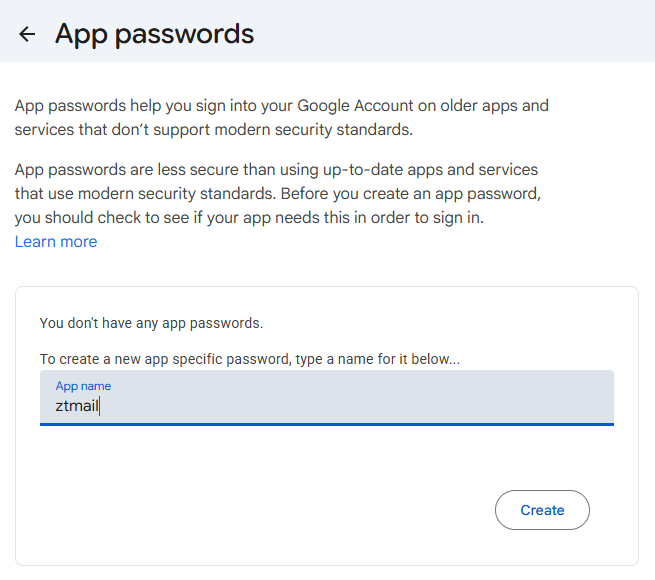
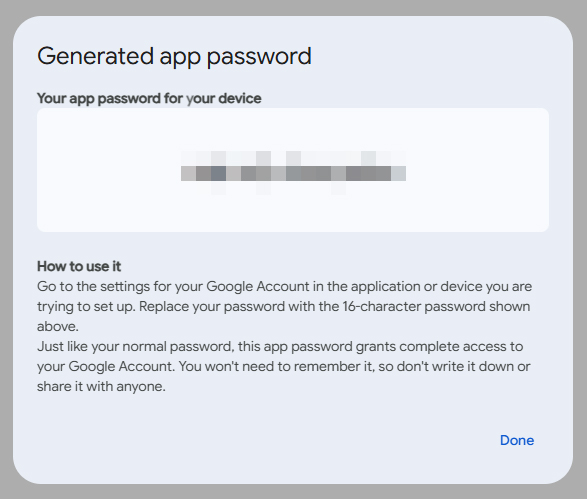
Gmail accounts can be configured through IMAP and SMTP. According to Google account security settings, you need to use an App Password instead of your regular Google account password. Please sign in to your Google Account settings to create an App Password before adding your Gmail account to ZTmail App.
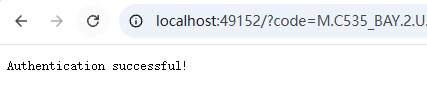
Outlook accounts use OAuth sign-in. ZTmail App allows you to sign in securely through your Microsoft account without entering your Outlook account password in ZTmail App. Just click 'Sign in with Outlook' on the right side of the add email account interface, and it will automatically take you to the Outlook login page. After entering your account password correctly, you'll see an authorization success page like the one shown below.
Q2: Why do I need to export and install my ZTmail App certificate in Windows to use it with Outlook?
AZTmail App manages your S/MIME certificate automatically within the App. Other email clients, such as Outlook on Windows, use their own certificate and key management mechanisms. To allow Outlook to decrypt emails encrypted by your ZTmail certificate, you need to export the certificate with its private key from ZTmail App and install it in Windows. After installation, Outlook can automatically use the certificate for decryption.
Q3: Do I have to use both RSA and SM2 certificates?
ANo. You can choose RSA, SM2, or both. ZTmail automates certificate enrollment while leaving the algorithm choice to you.
1. Gateway Basics
Q1: What is ZTmail S/MIME Automation Gateway?
AZTmail S/MIME Automation Gateway is a cryptographic gateway for organizations that automates S/MIME certificate lifecycle management, email encryption, decryption, digital signing, signature verification, and trusted identity. It is simply called ZTmail Gateway.
Q2: Does ZTmail Gateway require users to change their email clients?
ANo. ZTmail Gateway is designed to work at the gateway layer, allowing organizations to continue using their existing email clients and email infrastructure.
Q3: What is the difference between Hardware Gateway and Software Gateway?
AThe Hardware Gateway provides dedicated cryptographic infrastructure with a built-in Enterprise CA, organizational SubCA, HSM protection, and high-availability deployment options. The Software Gateway provides a lighter deployment model for organizations that do not require dedicated hardware CA infrastructure.
Q4: When should an organization choose the Hardware Gateway?
AThe Hardware Gateway is designed for organizations that require dedicated cryptographic infrastructure, centralized organizational trust, HSM-backed CA protection, high availability, and centralized S/MIME certificate lifecycle management. It is recommended for organizations that need to issue and manage S/MIME user certificates without a fixed limit on the number of user certificates issued by the organizational SubCA, particularly when dedicated infrastructure, redundant deployment, and organizational control are important requirements.
2. Email Security Integration
Q1: Does ZTmail Gateway replace an existing email security gateway?
ANo. ZTmail Gateway complements, rather than replaces, existing email security infrastructure. Existing systems can continue to provide threat detection, anti-phishing, malware detection, DLP, and content inspection, while ZTmail Gateway handles S/MIME cryptographic operations.
Q2: How does ZTmail Gateway handle inbound encrypted email?
AFor inbound encrypted email, ZTmail Gateway receives the S/MIME-protected message and performs the required cryptographic operations, including decryption, signature validation, and trusted identity validation. The resulting plaintext email is then passed to the organization's existing security infrastructure for inspection and processing.
Q3: How does ZTmail Gateway handle outbound email?
AFor outbound email, the organization's existing security infrastructure can inspect the message first. ZTmail Gateway then applies the required cryptographic operations, including S/MIME digital signing and encryption, before delivery to the recipient.
Q4: How does ZTmail Gateway work with our existing email security gateway?
AZTmail Gateway and your existing email security gateway perform different functions and work together. The existing email security gateway continues to provide threat detection, anti-phishing, malware detection, DLP, content inspection, and compliance controls. ZTmail Gateway provides S/MIME cryptographic operations, including certificate management, decryption, signature validation, encryption, digital signing, and trusted identity validation. Each system does what it does best.
Q5: Does ZTmail Gateway replace our existing email security gateway?
ANo. ZTmail Gateway is designed to complement, not replace, your existing email security gateway. Your existing security gateway remains responsible for email security inspection and policy enforcement, while ZTmail Gateway provides the cryptographic capabilities required for S/MIME email communication. This allows organizations to protect their existing security investment while adding automated email encryption.
Q6: Why does ZTmail Gateway need to work together with an existing email security gateway?
AEncryption and security inspection solve different problems. S/MIME protects email confidentiality and provides digital signatures and trusted identity. Conventional email security gateways provide threat detection, malware detection, phishing protection, DLP, and content inspection. When encrypted email cannot be inspected, security controls can lose visibility into the message content. ZTmail Gateway solves this by decrypting first, allowing security inspection to take place, and encrypting again when required.
3. S/MIME & Cryptographic Operations
Q1: Why is TLS connection used between ZTmail Gateway and email clients?
AZTmail Gateway uses TLS to secure email transmission between existing email clients and Gateway, so organizations can keep using their existing email clients without requiring users to switch to a new email client like ZTmail App, but the email is encrypted automatically by the Gateway for securely transmitted and encrypted for storage in the mail server.
Q2: Why is TLS used between ZTmail Gateway and the existing email security gateway?
ATLS protects the communication channel between ZTmail Gateway and the existing email security gateway. This allows the two systems to exchange email securely while maintaining their respective responsibilities: the existing gateway performs email security inspection, while ZTmail Gateway performs S/MIME cryptographic operations.
Q3: Does ZTmail Gateway require us to replace our existing email servers?
ANo. ZTmail Gateway is designed to work with existing email infrastructure. It adds a cryptographic application layer between the organization's email environment and the external email communication path without requiring organizations to replace their existing email servers.
4. Enterprise CA & Certificate Management
Q1: What is the built-in Enterprise CA?
AThe Hardware Gateway includes a built-in Enterprise CA that can establish a dedicated organizational SubCA for automated issuance and lifecycle management of ZTmail-trusted S/MIME certificates.
Q2: What is the purpose of the organizational SubCA?
AThe organizational SubCA provides a dedicated certificate issuance hierarchy for the organization, it is issued by ZTmail trusted root CA. It enables the organization to issue and manage S/MIME user certificates without a fixed limit on the number of user certificates issued by the SubCA, while keeping certificate lifecycle management under centralized organizational control.
Q3: Does the Hardware Gateway include an HSM?
AYes. The Hardware Gateway includes an integrated PCIe HSM to protect the organizational SubCA private key and provide hardware-backed protection for the organization's CA infrastructure.
Q4: Are employee private keys also stored in the HSM?
ANo. The HSM protects the organizational SubCA private key. Employee S/MIME private keys are generated and securely managed within the Gateway environment as part of the cryptographic lifecycle.
Q5: Can ZTmail Gateway use Public CA certificates?
AYes. Public CA certificates can be used for selected mailboxes that require Global Trust or broader external interoperability. ZTmail can automate certificate application and lifecycle management through supported CA integrations and its ACME service.
Q6: Can ZTmail Gateway support both ZTmail Trust and Global Trust?
AYes. ZTmail Gateway supports both trust domains. Organizations can use ZTmail Trust for organizational-scale S/MIME deployment and Global Trust for communication scenarios that require Public CA trust.
5. Deployment & High Availability
Q1: How is ZTmail Gateway deployed for high availability?
AZTmail Gateway is recommended to be deployed as a redundant high-availability pair, providing continuous cryptographic services and centralized S/MIME certificate lifecycle management for the organization. For the Hardware Gateway, the redundant pair provides the recommended deployment architecture for organizational S/MIME infrastructure, while the organizational SubCA enables centralized issuance and management of user S/MIME certificates without a fixed limit on the number of user certificates issued by the SubCA.
Q2: Does all email have to go through ZTmail Gateway?
AThe Gateway can be deployed according to the organization's email routing and security policies. Organizations can define which mailboxes, domains, trust levels, and communication scenarios require S/MIME protection, allowing the Gateway to apply cryptographic policies according to organizational requirements.
6. Cloud Cryptographic Service & Architecture
Q1: What is the role of ZTmail Cloud Cryptographic Service?
AZTmail Cloud Cryptographic Service provides cloud-based certificate automation and CA connectivity for ZTmail Gateway deployments. The role of the service depends on the Gateway deployment option and the type of certificate being used.
For Hardware Gateway deployments, the Gateway has a built-in Enterprise CA and can independently issue and manage certificates within the organization's ZTmail Trust domain. Therefore, ZTmail Trust certificates do not require the cloud service for certificate issuance. However, when an organization uses Global Trust certificates, the Hardware Gateway connects to the ZTmail Cloud Cryptographic Service to access ACME-based certificate services and automate certificate issuance and lifecycle management through the relevant Public CA.
For Software Gateway deployments, there is no built-in Enterprise CA or HSM. All S/MIME certificate types are therefore managed through the ZTmail Cloud Cryptographic Service, including certificates used within ZTmail Trust and Global Trust. In this way, the ZTmail Cloud Cryptographic Service provides a unified certificate automation layer while allowing Hardware and Software Gateway deployments to use different certificate infrastructures.
In short:
- Hardware Gateway + ZTmail Trust: Certificate issuance and management are handled by the built-in organizational CA.
- Hardware Gateway + Global Trust: Certificate automation uses the ZTmail Cloud Cryptographic Service and ACME.
- Software Gateway + all certificate types: Certificate automation uses the ZTmail Cloud Cryptographic Service.
Q2: What is the role of each component in ZTmail architecture?
AEach component has a specific role:
- Email Clients — Users read, compose, and send email.
- Email Servers — Provide the organization's email services and mailbox infrastructure.
- Email Security Gateway — Performs threat detection, anti-phishing, malware detection, DLP, content inspection, and compliance controls.
- ZTmail S/MIME Automation Gateway — Automates S/MIME encryption, decryption, signing, signature validation, trusted identity validation, and certificate lifecycle management.
- ZTmail Cloud Cryptographic Service — Provides CA connectivity and cloud-based certificate automation services.
ZTmail does not replace the systems that already work. It adds the cryptographic application layer that makes S/MIME practical for organizational email.
Q3: What does “Let Each System Do What It Does Best” mean?
AIt means that ZTmail does not attempt to replace every component of an organization's email infrastructure. Your existing email systems continue to provide email services. Your existing security gateway continues to inspect and protect email. ZTmail Gateway focuses on what it is designed to do: automate S/MIME cryptography, certificate lifecycle management, and trusted email identity. Together, these systems provide a more complete email security architecture without forcing organizations to replace their existing investments.
Q4: Can ZTmail Gateway integrate AI security?
AYes. AI security is optional. Organizations can continue using the AI and security capabilities already provided by their existing email security infrastructure. Alternatively, ZTmail Gateway can integrate AI-powered email analysis using the organization's preferred AI provider and API key.